
Have a Question? Let’s Start the Conversation!

Call : +9167415985038, +91 7003239986
Email : support@orbiontech.com

Salesforce Spring ’26: Apex Highlights Every Developer Should Know

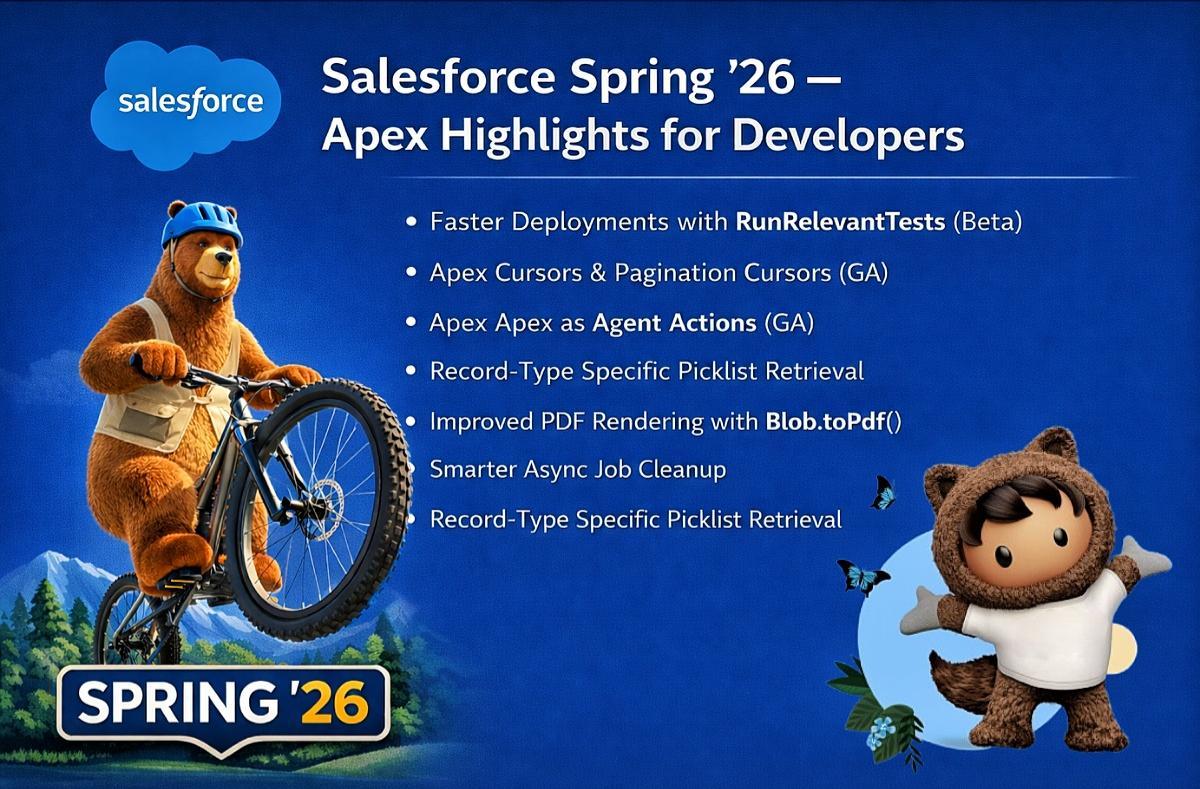
The Spring ’26 release from Salesforce continues a clear trend: reducing friction for developers while preparing the platform for AI-first, large-scale enterprise use cases.

Rather than introducing flashy abstractions, this release focuses on improving what Apex developers deal with every day—deployments, data volume, test management, async processing, and tighter integration with Salesforce’s AI ecosystem.

Below are the Apex enhancements in Spring ’26 that matter most in real-world projects.

Faster Deployments with RunRelevantTests (Beta)

Deployments no longer need to execute the entire test suite by default.
With RunRelevantTests, Salesforce intelligently runs only the test classes impacted by the Apex changes in your deployment package.

You can also control execution explicitly:

  • Mark tests that must always run using
    @IsTest(critical=true)

  • Ensure tests run when specific classes or triggers change using
    @IsTest(testFor='ApexClass:ClassName, ApexTrigger:TriggerName')

Why this matters

  • Significantly faster deployment cycles
  • Fewer CI/CD bottlenecks
  • Maintains coverage without unnecessary execution overhead

Apex Cursors & Pagination Cursors (GA)

Apex Cursors introduce a scalable alternative to Batch Apex for handling large data volumes.
Pagination Cursors extend this capability to UI use cases, enabling forward and backward traversal through large result sets.

Why this matters

  • Efficient large-data processing

  • Better user-facing pagination experiences

  • Reduced memory usage and governor limit pressure

Expose Apex as Agent Actions (GA)

Apex REST endpoints and @AuraEnabled methods can now be exposed as Agent Actions and managed via the API Catalog.
This enables direct orchestration with Einstein and Agentforce.

Why this matters

  • Apex becomes a first-class component in AI workflows

  • Cleaner integration between automation, agents, and backend logic

  • Reduced glue code between services

Record-Type Specific Picklist Retrieval

Developers can now retrieve picklist values for a specific record type directly in Apex using:

ConnectApi.RecordUi.getPicklistValuesByRecordType()

Why this matters

  • Simplifies dependent picklist logic

  • Eliminates fragile client-side workarounds

  • Improves consistency between UI and server logic

A small change with outsized impact on maintainability.

Improved PDF Rendering with Blob.toPdf()

Blob.toPdf() now leverages the Visualforce rendering engine, resulting in improved:

  • Font consistency

  • Multibyte and international character support

  • Layout fidelity

This makes server-side PDF generation more reliable for enterprise-grade documents.

Smarter Async Job Cleanup

A new overload of System.purgeOldAsyncJobs() enables controlled, incremental cleanup of old async jobs.

Why this matters

  • Safer cleanup in large, long-running orgs

  • Reduced operational risk

  • Better system hygiene without aggressive purging

Filtered Test Discovery API

The Test Discovery API now supports filtering by category (Apex or Flow).

Why this matters

  • Easier management of modular test suites

  • Improved tooling and automation workflows

  • Better visibility into test coverage by technology

Sharing Recalculation Preparation

Salesforce introduced a release update to help identify Apex and Flow logic impacted by upcoming sharing recalculation changes.

Why this matters

  • Enables proactive refactoring

  • Reduces surprise regressions

  • Helps teams stay ahead of platform-level behavior changes

Final Thoughts

Spring ’26 reinforces Salesforce’s direction toward:

  • Faster developer feedback loops

  • AI-first automation

  • Scalable, enterprise-grade architectures

For Apex developers, this release is not about radical change—it’s about removing everyday friction. And that’s exactly what a mature platform should focus on.

At Orbion, we see Spring ’26 as a strong signal that Salesforce is investing in long-term developer productivity, not just surface-level features.

Useful References

From “Where’s My Order?” to Wow: Our Einstein Agent Story

This Salesforce Einstein Service Agent case study walks through how we rebuilt a retail brand’s support flow on Experience Cloud with Omni-Channel routing. The aim was simple: instant answers for routine questions and clean, context-rich handoffs to the right human—without increasing headcount.

“No one repeats themselves—conversation context travels from the AI to the live agent.”

Context: A mid-market retail brand faced a familiar pattern: high volumes of “Where’s my order?” requests, peak-time bottlenecks, and after-hours gaps. Agents were spending too much time re-collecting information customers had already shared. The mandate: improve responsiveness and experience, not costs.

Client context

The retailer operates with tight delivery windows and seasonal spikes that can double ticket volume within days. Most contacts were “Where’s my order?” or questions tied to cancellation windows that expire quickly. Agents were competent but overloaded, and customers often repeated details across touchpoints. Success for this project meant three things: shrink time-to-answer on routine requests, protect specialist time for policy-sensitive cases, and keep the brand voice consistent when agents weren’t available. We agreed early on to measure first-contact resolution, deflections versus escalations, and the time from bot greeting to a human reply when a handoff was necessary.

The challenge

We needed to give customers immediate, trustworthy answers for common tasks while ensuring fast, fair routing to specialists when human judgment mattered. That meant keeping conversation context intact, respecting business hours, and avoiding “VIP overload” on senior agents.

What we built

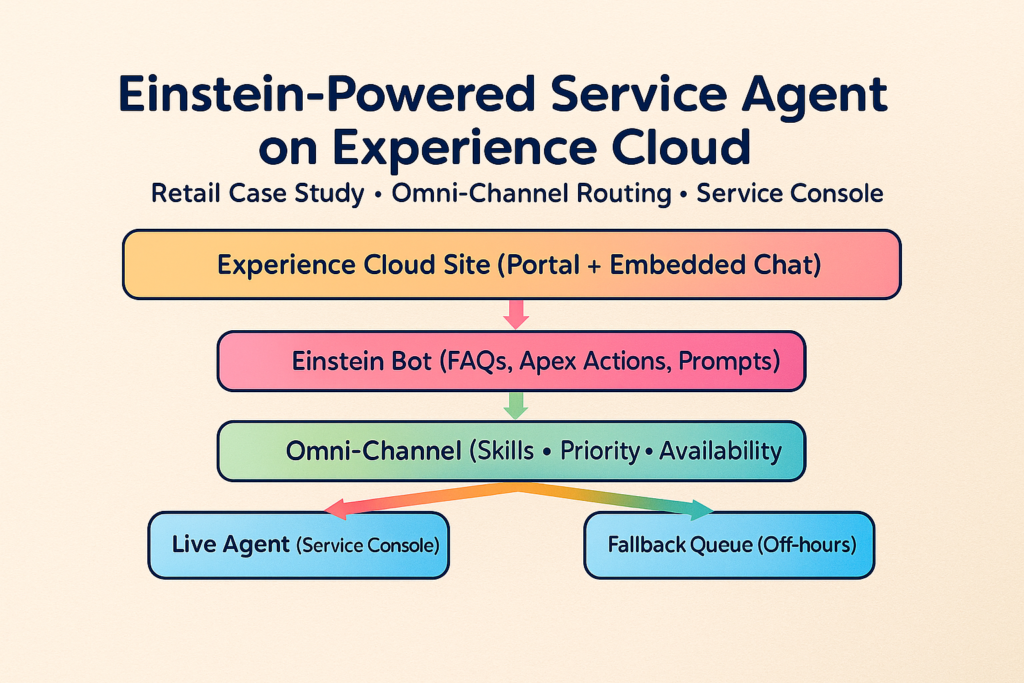
We implemented a branded Experience Cloud portal as the front door, an Einstein service agent (Agentforce) for first-contact automation, and Omni-Channel to route escalations into Service Console. Routine requests are answered instantly; sensitive or complex ones are handed to the right specialist with the full transcript and context. Together, this creates one flow: self-service when it’s safe, human expertise when it counts.

Experience Cloud (portal & chat): https://www.salesforce.com/products/experience-cloud/overview/
Agentforce (Einstein for Service): https://www.salesforce.com/agentforce/
Service AI overview: https://www.salesforce.com/service/ai/
Omni-Channel routing (overview): https://www.salesforce.com/service/digital-customer-engagement-platform/omnichannel-routing/
Omni-Channel routing (Help Center): https://help.salesforce.com/s/articleView?id=service.omnichannel_intro.htm&type=5
Service Console (agent workspace): https://www.salesforce.com/products/service-cloud/overview/

How it works

Customers start in chat for quick help. Simple questions—order status, return windows, store hours—are handled by the Einstein agent using lightweight Apex Actions to fetch data. When a request is sensitive (policy-bound cancellations, exceptions, complex returns), Omni-Channel evaluates skills, priority and availability, then hands off—with transcript and context—to the right live agent in Service Console. Outside business hours, a polite fallback queue acknowledges the request and schedules follow-up.
In this salesforce einstein service agent case study, we show how those handoffs stay fast and accurate without overloading specialists.

How routing was tuned

We started simple: intents map to queues, and queues map to skills. Then we layered three decision signals—confidence, policy sensitivity, and time window. If the model’s confidence dipped or the request touched an expiring window (cancellations/returns), the conversation was escalated. Omni-Channel then evaluated agent capacity and recent load so the same experts didn’t get hammered. We also added a polite pause before escalation to confirm intent, which cut accidental handoffs. After hours, a fallback queue acknowledged the request, captured any missing context, and triggered an email summary so agents began with a complete transcript rather than a cold start.

Architecture (snapshot)

Experience Cloud chat → Einstein service agent → Omni-Channel hub → Live Agent / Fallback Queue

Results from this Salesforce Einstein service agent case study

  • 24/7 coverage for routine queries with brand-safe answers

  • Faster escalations to the right specialist using skills & priority

  • ~30% fewer repetitive tickets, freeing agents for nuanced cases

Lessons & next

  • Signals for handoff: low confidence + policy sensitivity + time windows

  • Humane fallbacks: acknowledge clearly, set expectations, recap by email

  • What’s next: multilingual flows, additional channels (e.g., WhatsApp), and consolidated analytics for intents, FCR and queue health


Connect with us

If you’re exploring Salesforce service automation—from Einstein to Omni‑Channel—our team at Orbion can help you plan, implement, and optimize. Contact us to discuss your use case.